SONAR X1 brings a lot of significant changes from previous versions of SONAR; changes like the Unified Preferences View, ProChannel, Enhanced Automation, Key Clusters, the Skylight User Interface, and so much more. All of these changes are designed to enhance workflow, which means you can get more done in less time with SONAR X1.
The video below demonstrates SONAR X1’s enhancements versus previous versions, and I suspect most of them could apply to SONAR X1 versus other DAWs, as well.
“Here I connect the kitara to the cakewalk z3ta+ 2 software synthesizer. Basically, the kitara becomes an extension to the synth, as a new way to control it.
Survey: What content would you like to see more of in the future?
Since the release of SONAR X1, Cakewalk has stepped up its’ efforts to provide more free and paid content for SONAR X1 users. That started with the creation of CakeTV and SONAR U, and continues in 2012 with more blogging, videos, and content. It’s now time to capture your feedback on these valuable resources and see what you want more of (and less). Please take 5 minutes to fill out this special survey. The information you provide is confidential and will not be shared with any third parties. Thanks in advance!
To celebrate Marathon Monday here in Boston and our MARATHON Sale at the Cakewalk Store, here are 10 great reasons you should be runningSONAR X1 Producer today.
1. Begin with Better Training: Cakewalk has prepared free SONAR X1 training videos for every skill level on the SONAR U channel of CakeTV. Learn everything you need to know to get running quickly.
2. Take Your Qualifying Trial: Don’t believe us that SONAR X1 Producer is ahead of the pack? Try the new Skylight interface and ProChannel free for 30 days. Download the SONAR X1 Producer Free Trial.
In case you missed part one of this two-part series, Cakewalk’s Seth Perlstein shared his favorite SONAR X1 music production tips, tricks, and techniques like using the Mod Matrix in FX Chains 2.0, Groove Matching with AudioSnap, creating variations with the Loop Construction View, and much, much more.
Plus, he gave a sneak peak of the X1d patch, which is now free for all SONAR X1 users.
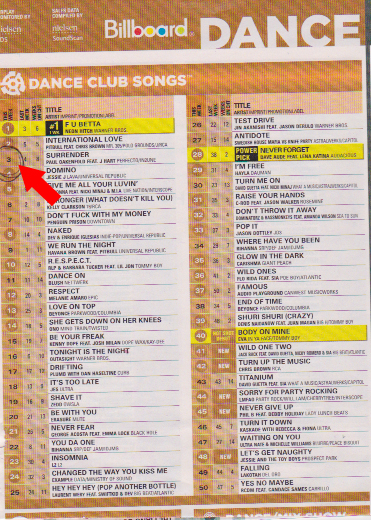
Congratulations to Paul Oakenfold and TC Spitfire who found themselves at #3 on the Billboard Dance Club Songs this past week with the track Surrender.
The track was written by Paul, TC and J Hart who also sang the track. TC Spitfire who is a passionate SONAR X1 Expanded user co-produced and mixed the track using a combination of all the ProChannel modules. “This new era with the ProChannel and X1d [Expanded] is on a serious elevated level. The combination of the modules has me staying more and more inside SONAR natively,” TC told us.
On a daily basis, TC is very busy individual. Between writing new music, producing, mixing and remixing, he finds himself a bit overextended these days and “taking it and enjoying it while it’s there.” Most recently, he has worked with artists such as Cher, Matt Goss, Matt Morris and Jean Baptist – and that is just in the recent past. “On a daily basis I will jump from remixing a track for 4 hours, to writing in another studio for 4 hours, and then back to our lab for another however-long-it-takes-session – for the next barrage of musical craziness.”
For the track Surrender which is currently charting on the Billboard Dance Club Chart, TC collaborated with both Paul Oakenfold and J Hart on the writing side and then built and mixed the song completely in SONAR X1 Expanded.
* * * * * * * * * *
CW AR: This vocal sound is huge in this track. What was some of the processing involved?
TC: On the vocal track I used the new Hybrid mode in the ProChannels QuadCurve EQ. I cut quite a bit of the low end off and had quite a bit of mids popping for this track around 1.8k. I was able to surgically cut out some other frequencies in the mids to get the vocals away from other keyboard parts in that range.
On top of that, I used the PC4K channel compressor along with a slight touch of the Softube Saturation Knob with the switch on the “high” setting. I also sent multiple lead vocal tracks out to a lead vocal bus which had the PCCL Limiter on it for a slight boost and some tightening.
CW AR: This track and all your tracks for that matter are really tight, what are the main factors for you in achieving this sound?
TC: It’s pretty simple, but it’s also pretty complicated. It’s simple, because most of it has to do with compression, EQ and limiting, which are 75% from the ProChannel in my tracks. It’s complicated because carving the frequencies, making the decisions on where to compress and how much, and what to use a limiter on – all factor in. Sometimes, over compressing and using too many limiters will just make a song sound flat-lined and not breathing. I think another factor is not using too many of the same compressors or EQ’s on every single track. I really like mixing up my inserts. On some tracks I will use the 76 and others I will use the Softube compressor. I even use the PC4K bus compressor on tracks – call me crazy – haaa. There are no rules in the digital world and use my ear and the tools SONAR X1 Expanded provides to get the sound to where I need it to be.
In the next year you will be hearing a lot more from Paul Oakenfold and TC as a new deal was just signed with Sony Records. As soon as the details are released on that we will keep you posted. Until then, you can check out SONAR X1 for free here.
SONAR X1 is the most intuitive D.A.W. on the market today. It’s easy to get up and running, and it’s just as easy with practice and experience to become an advanced user. If you are running windows, and you are a musician, now is a great time to pull the trigger with the SONAR X1 Advanced Workshop Giveaway Promotion.
“SURRENDER” [Completely recorded, mixed and mastered in SONAR X1 Expanded:]
Did you know that you can use the Event Inspector to easily edit multiple data events (such as MIDI notes) simultaneously?
In SONAR, right-click the Control Bar and choose Event Inspector Module to make the Event Inspector visible. If you don’t see it appear, you may need to hide some of the other Control Bar modules. Next, select some data (such as a group of MIDI notes) and then click a field in the Event Inspector. Either type in a new value or click the spin controls to change the value sequentially.
In addition, you can use modifiers (+/-) to change values. For example, if you want to add 23 to a velocity value of 37, type +23 for the Vel parameter and SONAR will automatically change the value to 60. The plus and minus modifiers work for all parameters, but the Vel (velocity) and Duration parameters can also accept a percentage for scaling values. For example, with 100% representing the current value, if you want to lengthen selected notes by 20%, enter 120% for the Duration value. If you want to shorten the same notes by 20%, enter 80%. For even more details and to see the Event Inspector in action, check out the following video. Versions 8.5 (and earlier) as well as X1 (and later) are covered.
Alex Niedt (pronounced “neet”) is a Kansas City recording artist, producer, and mix engineer whose releases include the Don’t Forget To Tip Your Bartender and Song To The Siren EPs and the Lex Luger-produced single “Hold Me Down”. In early 2012, Niedt won the MixFest Competition, hosted and judged by Grammy-winning mix engineer Dave Pensado, and appeared on the 52nd episode of Pensado’s Place.




 Congratulations to Paul Oakenfold and TC Spitfire who found themselves at #3 on the Billboard Dance Club Songs this past week with the track Surrender.