

[Originally posted as a daily tip on the SONAR forums and reposted for viewers here on the blog.]
The Overachieving Meters
by Craig Anderton
To change resolution for any audio meter, in any view, right-click on it and choose a range of 12, 24, 42, 60, 78, or 90 dB. Each meter can have its own range. With the Console view, I set the output bus meters to 12 dB to help gauge the approximate amount of loudness maximization that may be required.  For example, if the meters make it to 0 but otherwise spend very little time in those upper 12 dB, then the track will probably need to be made “hotter” when mastering. For the Track View track meters, choosing the maximum resolution (90 dB) helps reveal if there’s noise at the lower range of an incoming signal.
Vertical or Horizontal Metering
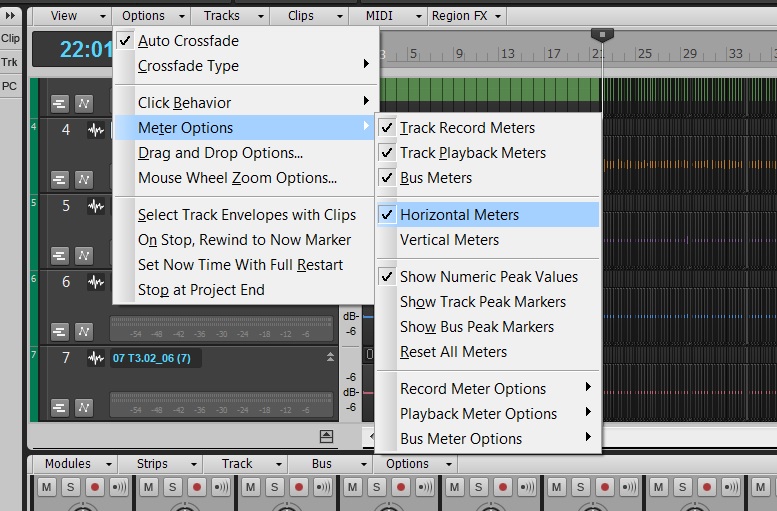
In Track View, the meters can be vertical or horizontal. Choose Options > Meter Options and select the desired option. When vertical, the meters behave more like activity/clipping indicators, because when you collapse the track to a short height, you basically see only activity and clipping. If you use the Console for mixing, this is a good choice because you can see more track parameters in the Tracks Pane, as the vertical meters don’t take up space along the bottom.
 If you generally mix using the Track View rather than the Console, then you can extend the width of the Track Pane, enable horizontal metering, set them to a fairly wide playback range, and enjoy high-resolution metering. Also under Options > Meter Options, you can specify the Record, Playback, and Bus meter characteristics. Choose from Peak, RMS, or Peak+RMS (my favorite choice) response, whether playback meters are pre- or post-fader, and whether bus meters are pre-fader, post-fader, or pre-fader and post-FX.
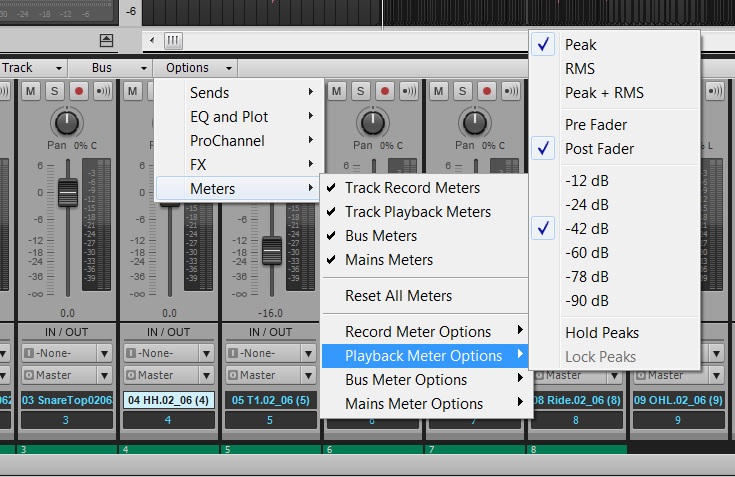
These settings are independent from equivalent meter settings for the Console view. You can also choose whether peaks are held or locked (I recommend checking both), as well as show Peak Markers. These indicate the highest point in the track and can be extremely useful when mastering.
This kind of flexibility allows the Track and Console views to be far more than just two ways to view the same type of material. For example, the Console meters are probably better set to post-fader, so you can see at a glance which tracks are contributing the most amount of level. But in Track view, a pre-fader setting lets you monitor track activity so you can check whether a Track has signal, regardless of the fader position. The metering options are just one more reason why I tend to mix in Console view, but track and edit in Track View.
Want to check our SONAR? Try our 30-day free trial.


 There is an interesting movement happening in the music industry. We have all seen it, and most are very opinionated about it… The EDM Revolution. Love it, like it, hate it – regardless, it’s here and thriving. I recently had the good fortune to spend a few very interesting days with
  If you are not familiar with Adventure Club [“AC”] they are a Canadian Elecronic Dance Music duo, composed of Christian Srigley and Leighton James, and based out of Montreal, Quebec. The duo formed while attending high school in Montreal as a hardcore pop-punk band, but later decided to move onto the more electronic sound of Electronic Dance Music (EDM) after simply getting bored with the pop-punk sound. The first song to put the duo on the map was their remix of the song “Daisy” by the American alternative-rock band Brand New, which was put on The Hype Machine, an MP3 blog aggregator website. After this track resonated deeply with EDM fans around the world, the duo was off to a solid start with a solid online fan base and foundation. What separates this group from other EDM acts is that they both are accomplished musicians with a great knack for music production in general. This translates into very solid tracks which they produce on their own in






 “Audio Production Jobs” come in all shapes and sizes these days;-) Yes, the music industry in general has shrunken to an all-time low in terms of major label budget projects, but the flip side is that there are many nooks and crannies out there to stay creative while making money. I think the key these days is getting into as many industry circles as possible, and then over-delivering. If you’re handed a job for writing, mixing, producing or even recording, and you knock it out of the park the first time with low-no hassles to the client, you will certainly come to mind on the next round. I would also be willing to bet that your name will be referred to other folks outside of that job’s “circle.” You just never know to where things are going to lead.
 Just a few weeks ago I was contacted by NYC singer-songwriter Jodi Good’s music attorney Steven Beer on a Friday night to discuss an opportunity for a “Holiday Song” to be placed with a major publication [for Monday]. Now usually, “Holiday Songs” are recorded around August or September and we were already at the end of November, so I knew this was going to be a tough one to accomplish especially since the song had to be written, recorded and mixed fast. The other strike against me was that this one was a bit out of my rock, and pop-rock comfort zones, but I knew the challenge would be a good experience on many different levels, so I decided to fire up the eggnog and go for it. Plus I had the comfort of knowing that Jodi is a great songwriter especially in the lyric department, so it was “weekend on.”
 Congratulations to SONAR X3 user Timothy Wynn on winning Best Score at the CineRockom Film Festival for “The Liberator” this year. With several globally successful franchises already to his credit ranging from blockbuster video games such as Command & Conquer, Dungeon Siege, GUN, The Punisher, Red Faction, 2K’s The Darkness II, The Simpsons and Warhawk to music in the hit television series Supernatural, Tim Wynn has gained international recognition as a leader in a new generation of highly talented and versatile composers.