Remixing in SONAR: An MGMT inspired remix using SONAR X2 Producer and Z3TA+ 2

While working as a Quality Assurance Engineer for Cakewalk I have the privilege and duty to test the latest builds before they are available to the public. While testing SONAR X2a and the CA-2A T-Type Leveling Amplifier I decided to work on an MGMT inspired remix of new song written by Cakewalk Graphic Designer Dan Kaplan.  Dan gave me the stems from his studio sessions and from there I remixed the song using SONAR X2 Producer, the CA-2A, and Z3TA+ 2.


When I first listened to Dan Kaplan’s song Sink or Swim one of my favorite things about the song was the dynamic between the male and female vocals. I thought it would be interesting to try and approach the song more as a duet or at least feature the female vocal more than in the original. I started by putting the original stems in one folder in SONAR and began setting up tracks for the remix in another. I created some instrument tracks for Session Drummer 3, Studio Instruments Electric Piano, and Z3TA+ 2. I then brought in sections of the bass and piano stems and began working on the first chorus trying to get the vocal dynamic working. I added Kick samples and built a pad to fade between chords using Z3TA+ 2. The Bass needed to be a lot more aggressive and the saturation knob in combination with some EQ got the sound I wanted. I used a synth sample from the original stems for the instrumental sections that reminded me of a MGMT riff and layered some different snares and claps to add more energy. Things were already moving well towards the end of the song but I needed to figure out how to get to the first chorus. I found a great background vocal sample from the end of the original track that reminded me of something the band FUN might do and thought that it would be a cool way to start the song. Using 4 different instances of SD3 I built the giant drum circle intro and added some of my own guitars using TH2. I put some rhodes and strings in the intro as well which to me kept the space that was there but left some nice texture. The strings also really helped the transition into the first chorus when the pad comes in and takes over.


I’ve always liked well planned vocal arrangements in pop music and wanted to build a 3 or 4 part vocal section for the end. I copied and moved the original chorus to the end and began playing around with other vocal samples to see where other phrases could come in without hurting the melody. It started with the female sample “There’s one more step” which besides adding to the context of the song helped setup the lead vocal when Dan repeats the same lyrics. I then used it for the bridge as well. I cut up the lyrics “Sink or Swim” that Dan sings and also layered that in a few choice spots.


I added some splashy electronic cymbal hits for added effect throughout the song and chopped some of the kick and snare samples to give it some life and not be too repetitive. I found a great long kick hit in the included sample library that I reversed for the sub swells along with reversing some other samples and sections of the guitar. Each track went through the A-Type console emulator which I think adds more air to the track and used a lot of the BREVERB SONAR plug-in for reverb on tracks and busses. To get the weird watery effect on the female vocals in the bridge I pulled out the original Z3TA+ which can be used as an audio plug-in also and found a preset to start with and tweaked it so the words were still understandable.


Listen to Dan Kaplan’s original version of Sink or Swim.

Sink or Swim

SONAR X1 & X2 Customers: Save $350 off the Waves Silver Bundle

Waves Bundle

Exclusive offer: Save $350 off the Waves Silver Bundle
Through a special arrangement with Waves, we are offering SONAR X1 and X2 customers the opportunity to purchase the critically-acclaimed Waves Silver Bundle (Native) for only $249 – save $350 off the regular price. Offer ends March 26th.

Waves Silver, an affordable new collection, was designed with personal production studios in mind.
With reverb, compression, equalization, level maximization, and more, Silver features 16 essential plugins that will take your music to the pro level. Now, you can join the ranks of the engineers and producers that count on Waves to deliver hit after hit after hit.

The bundle includes:

  • TrueVerb
  • L1 Ultramaximizer
  • Q10 Paragraphic Equalizer
  • C1 Parametric Compander
  • IR-L Convolution Reverb
  • SuperTap
  • Doubler
  • DeEsser
  • S1 Stereo Imager
  • Renaissance Axx
  • Renaissance Compressor
  • Renaissance Equalizer
  • MaxxBass
  • MondoMod
  • Enigma
  • Paz Psychoacoustic Analzyer
  • No iLok required

If you are new to the Waves, this is the perfect introduction to their powerful line of plug-ins.

Download the Waves Silver Bundle for $249

Upgrades to SONAR X2 start at $59

Free AAS Sound Bank & Player for all SONAR X2 Producer Customers

SONAR X2 Producer Content Club

Now Available: Free Sound Bank and player from AAS
When you purchase or upgrade to SONAR X2 Producer by April 30th, you can redeem one free Sound Bank courtesy of the SONAR X2 Producer Content Club. In March-April, you can take your pick and download one of the 12 available on the AAS store. Each were created by established sound designers covering genres from World Music to Synth Pop. Whichever Sound Bank you choose comes bundled With a free AAS Player plug-in [VST]. These Sound Banks are also designed to be expansion packs for AAS Chromaphone, Ultra Analog VA-1, or String Studio VS-1 – A $39 value.

To see the full selection and hear examples Browse all AAS Sound Banks

If you already own SONAR X2 Producer, your Sound Bank Redemption Code is now in your account.

Try SONAR X2 Producer for free

Find a SONAR X2 retailer near you

Upgrade to SONAR X2 Producer today

4 features of SONAR X2 that make the musician’s life easier (New Videos)

With all the powerful features of SONAR X2, it’s almost impossible for someone to know every single angle of the program.  Even some of the simpler features have some not-so-obvious aspects that can make the musician’s life easier and more musically inventive.  This is why we have created detailed videos for SONAR users to delve into without needing a manual.

This week we have posted four great new videos that are sure to give you some new insight on X2 features and workflow:

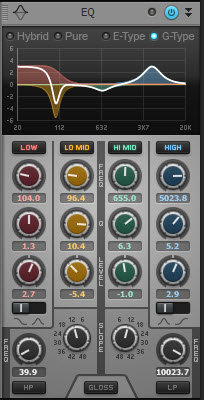
The QuadCurve EQ has now proven itself in the industry to be one of the most musical AND surgical instruments around.  With four different modes, it’s easy to carve out and sculpt perfect and professional mixes with ease.

[My favorite QuadCurve feature: The slope – cutting off low frequencies dead-off is essential for getting great vocals to really pop out of the mix without sitting too far in front. You can also greatly clean up your low-end by getting rid of competing frequencies utilizing the slope on guitars, bass and kick drum.] Continue reading “4 features of SONAR X2 that make the musician’s life easier (New Videos)”

Designing Sounds for Cakewalk Synthesizers – Behind the Scenes at Digital Sound Factory

Digital Sound Factory

When people ask me what I do for a living, it is often difficult for them to grasp the words; I record sounds and musical instruments that musicians use to create music. At Digital Sound Factory we breakdown the instrument to the fundamentals and capture the sounds that make up its character. Each note and playing style is recorded. We are essentially creating a ‘digital archive’ of musical instrument sounds that render playback on modern computers.

Creating sound expansion packs for Cakewalk synthesizers involves many steps in the development process. It’s a long journey from defining the scope of the sound set to hearing a sound when playing a MIDI note. This is an overview of how an expansion pack is born and what goes on behind the scenes.


Defining the Project

First we take a close look at the scope of the project and define the instruments and samples required.

Musicians, engineers, and studio time are not free, so the better prepared we are, the more we capture. Each instrument requires different considerations. Sampling drum’s is different from sampling synthesizers is different from sampling brass or winds. In the case of drums, how the drum should be tuned, number of velocity hits on center to the edge of the head, matching rim shots, various microphone placements, to name a few. Sampling brass or woodwinds will entail multiple volume levels of sustain, more breath, less breath, breath only, mutes, staccato, and more.


The Recording Process

Sampling is similar to recording music in some ways, but in other ways it is very different. The similarities are musicians are recorded in professional sound environments using microphones, mixing console, speakers, etc. The very different part is we are not there to record music. We record the instrument and its characteristics. I can’t begin to tell you how many sessions I have walked into and the musicians are ready to impress with great music. In these sessions we focus on the technique, not the music.

Each note the instrument is capable of playing is meticulously recorded at various amplitude levels and styles (ie: sustained, mute, fast attack, slow attack, soft, loud, etc.) using 4 – 16 microphones, fast computers, and Sonar. It is imperative that any addition sounds that are not part of the instrument, such as squeaky chairs, breathing, or noise from the musician are identified and eliminated during the recording process. Occasionally there are sounds that make their way into the sample and need to later be isolated and removed using software tools. All microphones, takes, tracks, hard drives, etc. are documented for use during the editing process.


Selection and Editing

After days, weeks, or months of recording, the tracks are reviewed and the best takes are sliced and copied to a new project. This may include as many as 4 to 16 tracks of microphones that can be mixed or separated to create the final individual .wav files for each pitch/velocity/etc. Selecting the best ‘takes’ involves a lot of listening and is essential to delivering the highest quality instruments. Any additional DSP (Digital Signal Processing), such as leveling, noise cancelation, equalization, and amplitude fades are completed at this stage. Sustained notes require looping the recordings to create a seamless pitch at the loop points. Loops are adjusted to lengths based on memory size targets. Each .wav file is tagged with the instrument name, style, and pitch identification.


SFZ Creation

SFZ files are created and used to map the incoming MIDI controller note number to the correct .wav file and location. The SFZ files are text files and use ‘opcodes’ or operation codes that are used to control various synthesizer program parameters. It contains relevant information about the instrument such as velocity, filter types, envelopes, LFO’s, and others. SFZ files are programmed for each playing style and sometimes combined to create layers.


Programming

This is where the instruments develop personality and flavor. SFZ files can be combined as elements to create layers. Filters, modulation sources and destinations, and effects are assigned. The program is named and saved to the relevant style folder.


Digital Sound Factory Recording Video

This video includes recording sessions for orchestral strings, winds, brass, and percussion in the concert hall and studio, drum kits and percussion, ethnic instruments, and grand piano.

Buy Sounds for Cakewalk Synths

Digital Sound Factory offers over fifty expansion packs for Cakewalk’s Dimension, Rapture, Sound Center, Z3TA+2, and Session Drummer 3.  Digital Sound Factory on the Cakewalk Store

DSF Sale

Download DSF Expansion Packs for as low as $19.95
Stock up this weekend on DSF expansion packs for Dimension Pro/Dimension LE. The DSF collection features thousands of sounds for all types of music and genres. Included are Grand Pianos, Guitars, Basses, Classic Keys, Orchestral, Hollywood Sound FX and much more. Buy one or buy them all and save big during this special offer. Ends February 28th, 2013.

Shop and save today

Testing the CA-2A in the Real World: Three Reasons it's a Must-Have Plugin for Mixing

I was recently hired to burn the ole midnight oil and produce, mix, co-write and play just about every instrument on an EP for an artist out of NYC.  The record is pretty cool, definitely fun to make, and it falls somewhere between Fiona Apple and Taylor Swift.  Considering the genre, I figured it was a great time to try out our new CA-2A T-Type Leveling Amplifier in the field and in a practical situation.
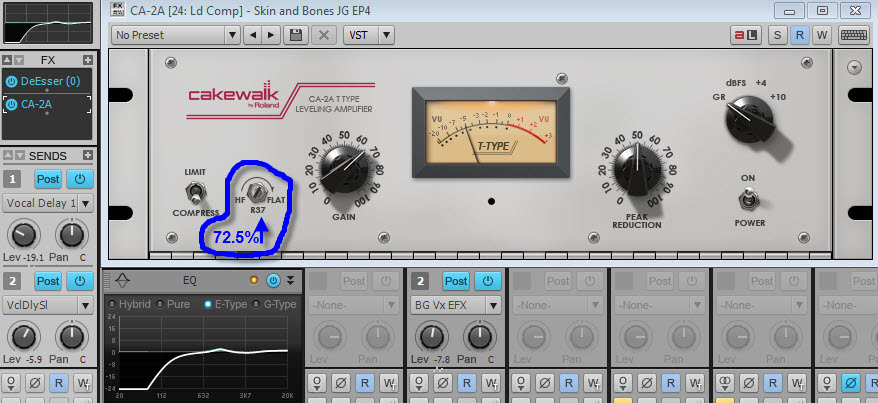
From testing the beta out briefly during development, I knew I was going to like the outcome of using the CA-2A, but what I didn’t expect was the versatility of the plugin.  I ended up using it on a lot more than what I expected.  From smoothing out vocals to arpeggiated guitars to piano tones, I really loved what I was getting from the CA-2A.  I also had the benefit of A/B’ing it with another branded Leveling Amplifier that I use, and I found the Cakewalk CA-2A thicker sounding in general and also more versatile due to the R37 screw [knob.]   Here are the reasons I found myself going to the CA-2A instead of my other comparable leveling amplifier.

1.)    R37 Adjuster on Vocals – This adjustable screw is interesting.  The physical appearance of the screw does not give off the importance of its usefulness.  Basically, this parameter allows you to adjust the compression on the high frequencies.  Since my other Leveling Amplifier does not have this adjustment, I always started out by keeping the screw all the way to the left (0%) and then dialing it in until I found the sweet spot.  The result was amazing especially on vocals.  I was able to always get a warm yet transparent sound but without the harshness on most of the “ess” words.  Since this project is with a female vocalist, I found it especially helpful.  I was also able to work the QuadCurve EQ into the mix and combine it with the CA-2A nicely.  By tweaking the hi-end frequencies on the EQ along with the R37 screw, I was able to get a more present vocals without any harshness.

2.)    “Limit” Mode on Bass Guitar – I’m not sure if it will be like this for every song, but for this track the CA-2A on the bass guitar in “Limit” mode was a magic bullet.  I always run the bass into its separate bus, so I ended up using the limiter on that stage.  I played the bass guitar (as you can hear from the track on this post) with a pick for this song.  The CA-2A in limiting mode on the bass bus really allowed me to fatten up the sound of the low end, but also kept the attack of the pick in focus.  It leveled out the attack of the pick hitting the string but also kept it present.  I had the EQ running on the bass track, and then the limiter on the bass hitting the peak reduction at about -3db.  I kept the R37 at 0% as you can see from the image.

3.)    “Compress” Mode on Piano and Whirlie – fortunately for this track I had the benefit of having David Cook (keyboardist and MD for Taylor Swift) play on the track – the guy is a genius.  I’m pretty much a hack at keyboards so my usual piano editing (to make myself sound decent enough) was not going to cut it.  As you can hear from the attached track, there is a lot going on in the song, so I had to figure out a creative mixing strategy to make room and carve frequencies.  To say that the CA-2A helped me achieve this on the track would be an understatement.  Using the plugin in compress mode on the piano enabled me to really place it in the mix correctly.  It also helped dial in the frequencies to get it out of the way of all the other things that were in the same frequency range.  To get the piano to sit correctly, I hit the compressor pretty hard, used the R37 at 50%, and then notched up the highs of the QuadCurve EQ.  I also used the Channel Tools plugin to give it some more width and depth and get it out of the way of the guitars.  The more I use this, the more I understand the importance of the R37 screw.  It’s almost an oxymoron, but by combining the R37 with the high-end frequencies on the QuadCurve EQ it seems like I am able to get a warm top end sound out of instruments.

On the rest of the track I also ended up using the CA-2A on some acoustic guitar tracks as well as one of the clean electric guitars.  I’m psyched about the performance and versatility of this plugin – instantly you can hear the difference wherever you use it.  I also think this is a plugin that would be a great benefit to folks who are just getting into mixing.  The simplicity of the unit basically makes it fool proof for obtaining professional results without a lot of technical worries – basically just use your ear and turn the knobs;)

Try the CA-2A T-Type Leveling Amplifier for free

Thanks for reading and be sure listen to the mix posted below.

The song on this post uses the CA-2A on exactly the following tracks:
Lead Vocal track (Compress Mode)
Bass bus (Limit mode)
Piano track (Compress Mode)
Whirlie track (Compress Mode)
B3 track (very lightly) (Compress Mode)
Left acoustic guitar track (both mics)  (Compress Mode)
Arpeggiated Electric Guitar track (Compress Mode)
1 of the backing vocal tracks (Compress Mode)
Tom drums bus (Limit mode)
Hi Hat (Compress Mode)
Mandolin track (Compress Mode) (doubled – CA-2A only on 1 of the tracks)

Extended: Free TH2 Building Block Presets for SONAR X2 Producer Customers

TH2 Building Blocks

When you buy SONAR X2 Producer through February 28th, you will also get free TH2 Building Blocks presets created by Cakewalk’s Jimmy Landry. TH2 Producer is a powerful instrument with many tonal possibilities.  Although it comes with some interesting presets, there is definitely room for more.  These “building block” presets were designed in an exceptional listening environment and aimed to deliver an array of great “source sounds” from which to build.  Much time and effort was taken to carefully match the mics, cabs and amp heads for a comprehensive set of sounds.  Using this set as a starting point will give you a great head-start when utilizing the “variation” user preset feature in TH2 Producer.  

Read the original post by Jimmy Landry

Find a SONAR X2 retailer near you

Upgrade to SONAR X2 Producer today

There's always more to learn about SONAR with new videos from Cakewalk

SONAR X2 is hands-down the most powerful and comprehensive DAW we have ever made. With each new version of SONAR we aim to simplify workflow and make music production more efficient.  Each upgrade also comes with brand new tools and enhancements that compliment SONAR’s core technology.  SONAR X2 is no exception. See what’s new in SONAR X2.

Your creative possibilities are endless with a professional level solution like SONAR X2.  But for new users, and even some seasoned SONAR pros, all this power can make your brain hurt a little.  Users often ask us questions like “what does R-MIX SONAR do?” “how does the Console Emulator effect my mix?” and “why is TH2 Producer better than the guitar amp sim that I already have?”  We hear you loud and clear and want to make sure you know how to take full advantage of the tools SONAR X2 has to offer. As a result, Cakewalk is more committed than ever to providing SONAR users with the best learning resources available. Check out the 3 learning resources below with SONAR knowledge for every skill level Continue reading “There's always more to learn about SONAR with new videos from Cakewalk”

Limited Time Offer: Music Creator 6 for just $19.99 plus free video guide

Music Creator

Download Music Creator 6 for only $19.99
Music Creator 6 turns your computer into your own personal recording studio and includes everything you need to create, edit, and mix professional recordings. Whether it’s a cover of your favorite tune or an original composition, turn a simple idea into a finished song with Music Creator’s powerful suite of tools, loops, instruments, and effects. And when you’re ready to share your music with the world, you can burn a CD or use SoundCloud to post your music on Facebook and Twitter.

Based on Cakewalk’s acclaimed professional studio software, Music Creator’s elegant design and drag and drop interface makes creating and sharing music fast, easy, and fun.

Through February 19th, you can download Music Creator 6 for only $19.99 – save 60% off the price.

Buy Music Creator 6


How to Record Music on a Windows Computer – A Free Video Guide

Recording and making music on your computer can seem overwhelming when you are just getting started. You have the musical ideas in your head but you need to get them down and into a finished song format. This post will walk you through device setup, recording audio, playing virtual instruments, working with loops, and more.

Learn to record with Music Creator 6